Last updated: September 24, 2026
Pixel Gun 2 Beginner Guide (August 2026) — Tips, Controls & Progression
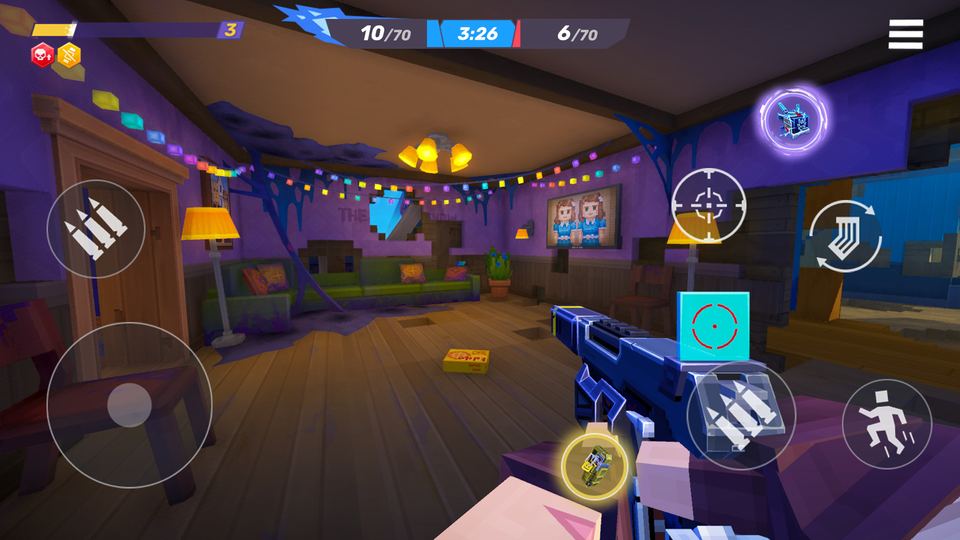
Getting started in Pixel Gun 2 means learning one big new mechanic on top of everything Pixel Gun 3D veterans already know: destructible environments. This beginner's guide covers controls, how progression and cross-platform saves work, and the tips that matter most in your first few matches.
How do I get started in Pixel Gun 2?
Download Pixel Gun 2 from Google Play, the App Store, then log in with your account. The game will walk you through a short tutorial covering movement, shooting, and building placement before dropping you into your first real match. Take the tutorial seriously — Pixel Gun 2 adds new destruction mechanics that PG3D veterans haven't dealt with before.
What is the destructible environment mechanic in Pixel Gun 2?
Destructible environments mean walls, crates, and other cover can be shot or blown apart mid-match, permanently changing the map as the round goes on. This has a few practical effects for beginners: don't get too comfortable behind any one piece of cover, listen for destruction sounds nearby since they signal a new sightline just opened, and use destruction offensively by shooting through weak cover instead of waiting for enemies to peek out.
Does Pixel Gun 2 carry over progress from Pixel Gun 3D?
No. Pixel Gun 2 is a separate game with its own fresh account and progression — it does not import your Pixel Gun 3D Coins, Gems, or unlocks. What it does carry over is the same dual-currency system and pixel-art style, so the underlying economy will feel familiar even though your specific account starts from zero.
How does cross-platform progression work in Pixel Gun 2?
Your Pixel Gun 2 account and progress are shared across Android, iOS, and Steam. Log in with the same account on any of the three platforms and your Coins, Gems, and unlocks all carry over, so you can start a match on your phone and pick it back up on PC later.
Best beginner tips for Pixel Gun 2
- Complete your daily quests every single day — they're the fastest early source of Coins.
- Check the codes page regularly; new codes carry expiration windows.
- Don't spend Gems on cosmetics in week one — save them until you know which weapon category actually performs best in the live meta.
- Use destructible cover offensively. Shooting through a thin wall can catch campers off guard.
- Finish every match instead of quitting early, since leaving early usually cuts your reward significantly.
- Check our tier list once it's rebuilt with real launch data before investing heavily in one weapon category.
Controls overview
Pixel Gun 2 uses the same touch-control layout Pixel Gun 3D players are used to on mobile: a virtual joystick for movement, a fire button, and a jump/build button in the corner. On Steam, expect standard WASD movement with mouse aim, matching typical PC shooter conventions. Full control remapping is expected to be available in Settings, as it is in Pixel Gun 3D.
Frequently asked questions
How do I get started in Pixel Gun 2?
Download the game from Google Play or the App Store, log in with your account, and complete the tutorial before jumping into ranked or casual matches.
What is the destructible environment mechanic in Pixel Gun 2?
Cover like walls and crates can be shot apart mid-match, permanently changing sightlines and forcing players to constantly adapt their position.
Does Pixel Gun 2 carry over progress from Pixel Gun 3D?
No, Pixel Gun 2 uses a separate account and progression system, though it keeps the same Coins-and-Gems currency structure.
What are the best beginner tips for Pixel Gun 2?
Finish daily quests, redeem codes early, save Gems until the meta settles, and use destructible cover to your advantage instead of just hiding behind it.
How does cross-platform progression work in Pixel Gun 2?
One account carries your Coins, Gems, and unlocks across Android, iOS, and Steam, so progress follows you between devices.
Continue to our tier list, grab the latest codes, or return to the Pixel Gun 2 hub.